Know who's really behind every email.
Safemarker checks the identity signals behind each Microsoft 365 email and labels it Trusted, Caution or High Risk — before anyone acts on it.
- Live in 10 minutes
- ISO/IEC 27001
- Hosted in the EU




Marta Keller · CFO
marta.keller@northbridge.example
Re: Q3 board pack — final version
Attaching the final version for Thursday. Same deck as Monday, last comments in.
Trusted
Every check passed.
- SenderConfirmed
- DeviceKnown laptop
- LocationAmsterdam
- TimeUsual hours
- WordingNormal


A real mailbox can still send a fake request.
No dodgy link. No attachment. The right address, the right name, the right thread. Filters see nothing wrong — because nothing is wrong with the email.
 “Hi, it's Sarah 👋”
Step 1
An attacker gets into Sarah's mailbox
Step 2
They write to you as Sarah, in an existing thread
Step 3
Every inbox check passes. You reply.
With Safemarker, the 09:02 email is flagged.
New device, an hour Sarah never works, a request she never makes. The reader sees a High Risk label with all three reasons — before they touch the email.
See it in action.
An email from someone you know, sent from their real address. Watch it pass every technical check, get flagged inside Outlook, and land in front of your security team.
Two screens. Only one is in anyone's working day.
Your team keeps reading email as usual. The verdict is simply there.
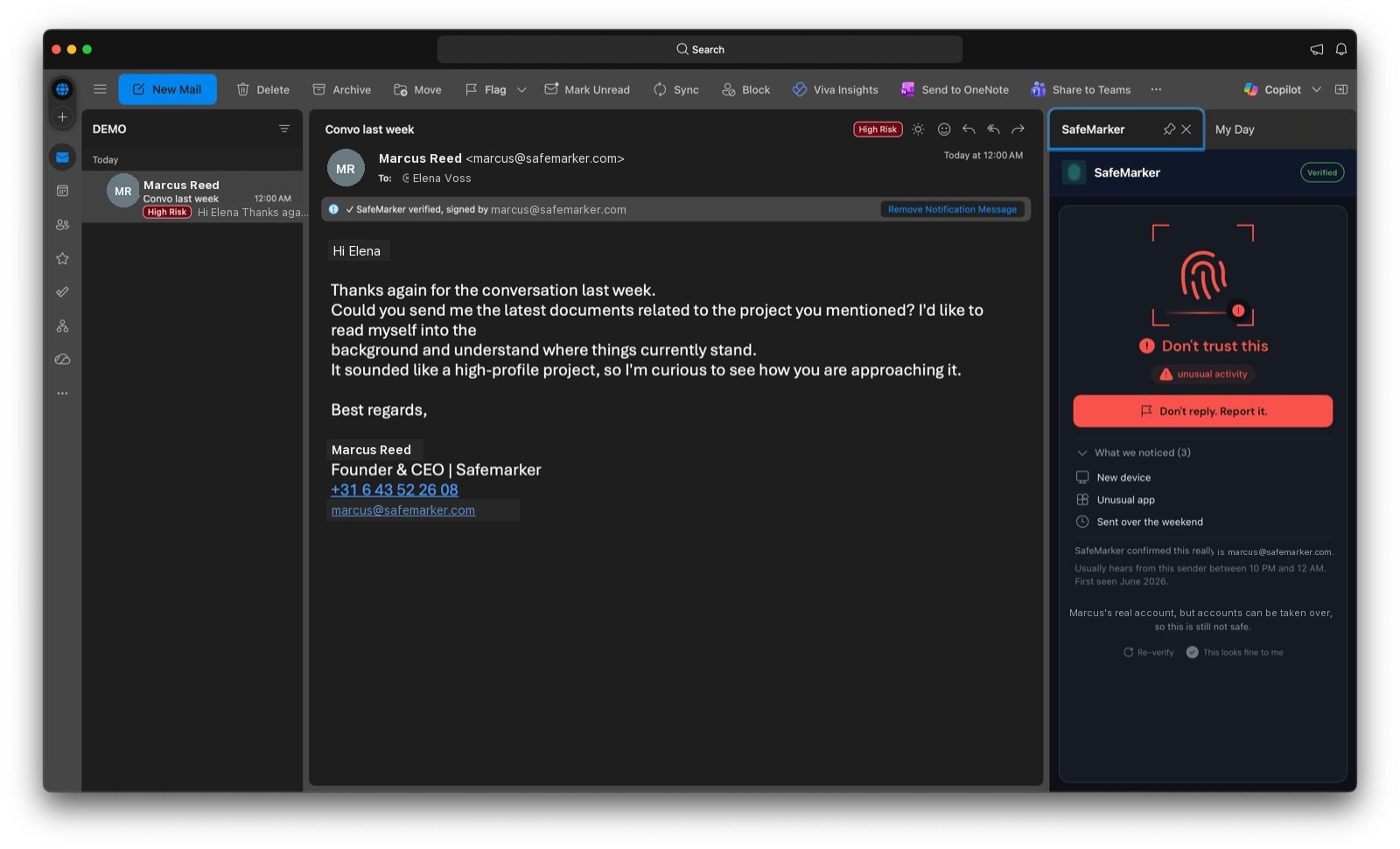
Built for the person about to act.
- 1
The label comes first. One glance tells you how carefully to read.
- 2
Reasons in plain words. “Asks for sensitive data” — not a rule ID.
- 3
A clear next step. Matched to what's wrong, not a generic warning.
- 4
On every device. The label lands on the message itself, seconds after arrival.
What Safemarker catches.
Account activity, sender behaviour and email analysis — combined into one verdict.
Business email compromise
Suspicious activity from legitimate accounts — the attack every other filter lets through.
- Account takeover
- Supplier compromise
- Conversation hijacking

Sender impersonation
Lookalike domains and display names posing as people you know.

Payment fraud
Changed bank details, payment instructions and fake portals.
Credential phishing
Fake sign-in pages behind links or QR codes.

Calendar phishing
Malicious links and suspicious organisers in invites.
Your filters check the email. We check the person.
SPF · DKIM · DMARC
Confirm the email came from servers allowed to send for that domain.
Doesn't confirm who is using the account
Spam & phishing filters
Look for bad links, attachments, reputation and known patterns.
Miss a compromised trusted account
Safemarker
Compares each email with what's normal for that sender — device, location, timing, behaviour — plus lookalikes, links, QR codes and invites.
Shows an identity verdict on the message
Plugs into Microsoft 365. Replaces nothing.
Not a secure email gateway. Safemarker connects through Microsoft's own API — nothing to reroute, nothing to rip out.
10 min
to set up the whole organisation
0
changes to how people work
No
gateway, MX change or rerouting
- 01
Approve access
An admin approves Safemarker in Microsoft 365.
- 02
Roll out the add-in
Deployed centrally to everyone — or a pilot group.
- 03
First verdicts, same day
Identity profiles build in under 5 minutes.



Verify email across organisations.
When your suppliers and partners use Safemarker too, both sides can confirm who is really behind the email.
Your company
Verified
Supplier
Verified
Partner
Verified
We never store your email.
Privacy isn't a setting. It's how Safemarker is built.
ISO/IEC 27001 certified
Information security management
Hosted in the EU
A Dutch company. Email data is processed and stored in the EU.
Email content is never stored
We keep the verdict and its signals — never the body or attachments.
No AI decides the verdict
Your email content is never sent to an LLM.
ISO/IEC 27001 certified
Certified to the international information security standard.
One verdict. Two people who need it.

Everyone with a mailbox
For the person reading the email
- Nothing new to learn — the label is on the email they're already reading.
- No squinting at lookalike addresses.
- A clear next step, not a warning they've learned to ignore.

Whoever owns security
For the person responsible for security
- Every detection explains why it fired.
- A full record: who, what, when, where, and what we decided.
- Quarantine, report or respond straight from the detection.

Put a clear verdict on every email.
Start with a pilot group and see verdicts the same day. Turn it off any time — your mail keeps working as before.
Same-day replyEvery working day
On your own tenantAgainst real traffic
European UnionEU company, hosting and law